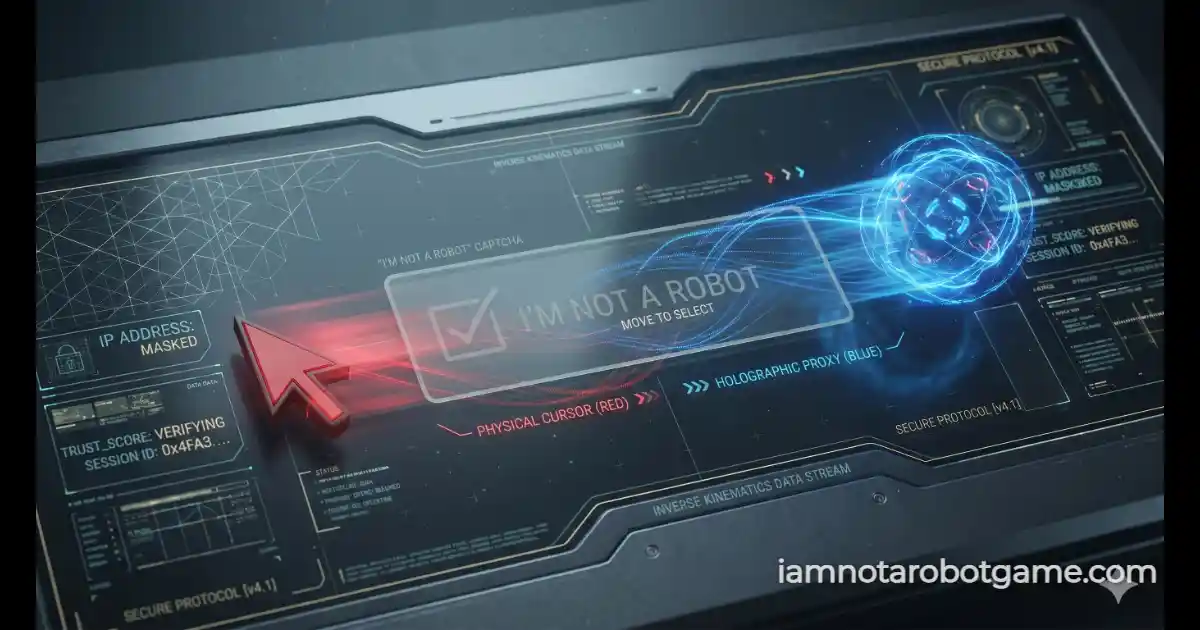
 Fig 1: The inverted kinematic tracking matrix evaluating cognitive plasticity.
Understanding Inverse Kinematic Motor Control
Welcome to Level 13: Reverse. Traversing past the initial checkbox of Level 1: The Checkbox, the street sign grid of Level 2: Stop Signs, the optical displacement of Level 3: Wiggles, the botanical sorting of Level 4: Vegetables, the spatial rotation of Level 5: Rotation, the Minimax stalemate of Level 6: XOXO, the lexical word search of Level 7: Word Search, the security camera plate transcription of Level 8: License Plate, the recursive scaling of Level 9: Nested, the high-speed reflexes of Level 10: Whack-a-Mole, the anomaly search of Level 11: Waldo, and the image classification of Level 12: Muffins (Chihuahua), the verification gauntlet confronts direct motor-cognitive dissonance. Level 13 introduces an inverted kinematic control scheme that mirrors your X and Y pointer trajectories, challenging your brain's natural hand-eye coordination loop.
Step-by-Step Inverse Kinematic Strategy
The verification console conceals your native cursor within an interactive playground arena and replaces it with a glowing blue proxy cursor. As you move your mouse or swipe across a touchscreen, the proxy moves in the exact opposite direction across both axes. To guide the proxy onto the "I am human" verification box without losing control, execute this behavioral adaptation protocol:
- Engage the Inverse Control System: Click the "Engage System" overlay button to activate the arena and start the hardware completion timer. Your native cursor vanishes inside the boundary.
- Disengage Hand-Eye Conditioning: Do not watch your physical hand or mouse position. Human motor control relies heavily on visual feedback; fighting your ingrained muscle memory is the primary hurdle of this stage. Focus solely on the glowing blue orb.
- Apply Inverse Vector Adjustments: If the proxy cursor needs to travel Up and Left to reach the target box, physically slide your mouse Down and Right. Horizontal and vertical movements are inverted simultaneously around the center point of the container.
- Hover and Verify: Guide the glowing orb directly over the "I am human" checkbox container until the target box highlights with a blue focus border. Click while the proxy is intersecting the box to log your completion time and unlock Level 14: Affirmations.
Why Inverted Kinematics Neutralize Bot Teleportation
Standard automated bot frameworks, macro clickers, and headless testing scripts bypass graphical user interfaces by dispatching synthetic click events directly to static document coordinates.
Level 13 defeats programmatic bots through inverse coordinate mapping:
- Dynamic Proxy Intersection Validation: The victory condition does not evaluate where your native mouse cursor or physical touch event occurs. Instead, it evaluates the exact client-side coordinates of the rendered proxy cursor. Because a script cannot visually interpret or adapt to a mirrored coordinate space without writing complex inverse transformation matrices, automated clicks land in empty space.
- Cognitive Plasticity Verification: Human beings possess remarkable cognitive plasticity—the ability to adapt to sensory-motor inversions within seconds by overriding cerebellar motor loops. By testing this adaptation speed, Level 13 provides definitive proof of biological neural processing over static machine execution.
Cognitive Plasticity and Sensory Adaptation
In neurological research, mirror-tracing and inverted control tasks are classic metrics for measuring human motor learning speed. When presented with conflicting sensory input, the human brain rapidly re-calibrates spatial coordinate mapping within a few dozen iterations.
Successfully navigating this sensory-motor inversion proves biological neural adaptability. Prepare your patience, because once your motor plasticity is confirmed, you will face the psychological endurance trials waiting in Level 14: Affirmations.
Frequently Asked Questions
How do I beat Level 13 Reverse?
Engage the system, focus entirely on the glowing blue proxy cursor instead of your physical hand, and apply inverse motor movements (moving left moves the proxy right, moving up moves it down) to guide the orb into the "I am human" box before clicking.
Why is my mouse moving backwards in this level?
The JavaScript engine captures your pointer movements relative to the center of the arena, multiplies those coordinates by negative one (-1), and maps them to the proxy cursor, creating a mirror-image control scheme.
Can an automated bot solve this level?
Basic automation scripts fail completely because they attempt to click hardcoded screen coordinates, entirely ignoring the mirrored proxy cursor required to trigger the validation check.
What happens if I click while the proxy cursor is outside the target box?
Clicking outside the target box registers as a failure, triggers a visual error shake on the interface, flashes the proxy red, and penalizes your completion time.