
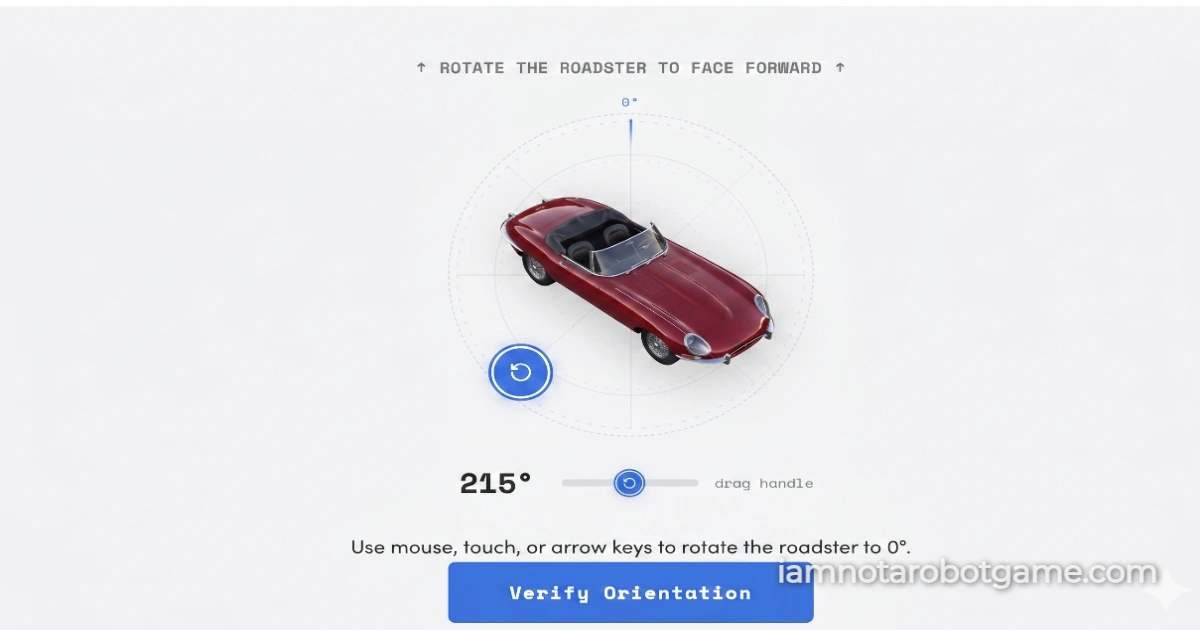
 Fig 1: The dynamic spatial orientation matrix evaluating continuous angular coordinates.
Understanding Continuous Spatial Alignment
Welcome to Level 5: Rotation. Progressing past the boolean click of Level 1: The Checkbox, the visual grid parsing of Level 2: Stop Signs, the optical frequency decoding of Level 3: Wiggles, and the botanical taxonomy of Level 4: Vegetables, the security matrix shifts into continuous spatial orientation. Level 5 introduces an analog kinetic trial requiring direct manual manipulation: orienting a randomly tilted three-dimensional object until it rests perfectly upright along its vertical axis.
Step-by-Step Spatial Orientation Strategy
The verification arena displays a centered object rendered at an arbitrary angular tilt between 13 and 347 degrees. Surrounding the canvas is a circular guide ring equipped with a draggable orbital handle and an alignment mark at true north (0 degrees). To complete the calibration quickly without failing verification checks, follow this technique:
- Identify the Natural Upright Axis: Visually scan the displayed object to determine its anatomical or structural base. Common test items include chairs, vehicles, and animals. Identify which side corresponds to the ground plane (such as wheel contact points, paws, or chair legs).
- Grab the Orbital Handle or Central Target: Click and hold the circular blue drag handle or click directly onto the target object. Both touch points support unified pointer-event capturing, allowing smooth operation via mouse, finger touch, or stylus.
- Rotate Along the Circular Orbit: Drag your pointer in a steady circular path around the center pivot. As the object turns, monitor the live degree readout and proximity indicator below the arena.
- Align Within the Acceptance Threshold: The verification engine enforces an acceptance tolerance of plus or minus 12 degrees from true vertical (0 or 360 degrees). When your rotation angle enters this threshold, the proximity bar fills completely, turns green, and highlights an arc along the top perimeter.
- Confirm Submission: Release your pointer and click the "Verify Orientation" button. Successful alignment triggers the confirmation sequence and logs your completion time.
Keyboard Accessibility Controls
If you are navigating without a pointer device or touch screen, Level 5 provides full keyboard accessibility. Press the Tab key until focus outlines the blue orbital handle. Use the Left and Right Arrow keys to adjust the angle in two-degree micro-steps. Holding the Shift key while pressing the arrow keys increases the adjustment rate to ten-degree increments.
Why Trigonometric Rotations Defeat Automated Scripts
Digital CAPTCHAs frequently challenge bots using static image grids or textual puzzles because machine-learning classification models can be trained on static label sets. However, continuous rotational alignment presents a distinct structural hurdle for automated browser tools:
- Absence of Pre-Calculated DOM States: The object's starting tilt is generated via client-side randomization on every initialization, bypassing the narrow 24-degree success corridor. Headless automation scripts cannot guess the starting angle from static HTML markup because the angle exists solely within local script memory.
- Continuous Coordinate Kinematics: Calculating true vertical alignment requires dynamic trigonometric calculations. The system measures user input relative to the arena's center using the arctangent function (
Math.atan2). Standard click bots that generate discrete, instantaneous click coordinates fail because genuine rotation requires a continuous stream of pointer events along an orbital arc. - Resistance to Computer Vision Scraping: Computer vision models can detect what an object is (for example, identifying a dog or chair), but determining precise rotational alignment relative to variable camera perspectives requires complex spatial understanding. By requiring biological spatial intuition to orient diverse object categories, Level 5 ensures reliable proof of humanity.
Frequently Asked Questions
How do I beat Level 5 Rotation?
Drag the blue circular handle around the arena until the object is upright, aligning it within 12 degrees of the top 0-degree mark, then click "Verify Orientation".
Why does the object jump or stop moving when my mouse leaves the circle?
The interface uses pointer capture to track input across the full screen once dragging begins. If movement halts, ensure you are holding down the primary mouse button or maintaining continuous contact on mobile touch screens.
How precise does the upright alignment need to be?
The puzzle allows a tolerance window of plus or minus 12 degrees (between 348° and 12°). The live degree counter and progress bar will turn green as soon as you enter this valid zone.
Can I change the object if it is difficult to identify the upright position?
Yes. Click the circular reload button in the header bar to immediately load a new randomized object with a fresh starting angle.